Candy Hole by 100HP Gaming: an instant game you steer by hand
There are no reels here and no lines. A round gives you a small hole on a field of desserts, you drag it about by mouse or finger, and everything it swallows adds to a coefficient you can turn into money whenever the round lets you. This page says what the product is, what is actually published about it, and what the interface will not tell you until it happens.
The game
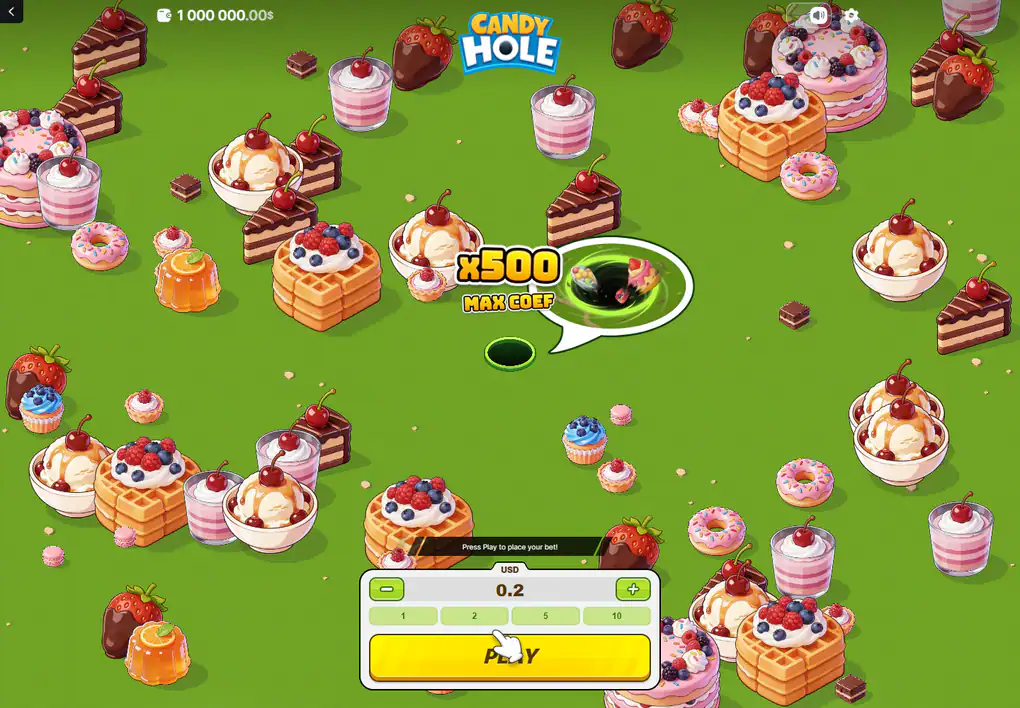
Everything the game announces before a round: a ceiling, an amount and one button.
What Candy Hole actually is
100HP Gaming files this title under one word in its own catalogue, and the word is "Casual". Not a slot and not a crash game. The studio's description is short and worth reading before anybody else's: you control a black hole with a sweet appetite, you absorb candies to increase its size and grow the active multiplier, hidden mines can end the round before you secure anything, and you can cash out to lock in the value you have.
Every one of those clauses matters later on this site, because four of them describe things the recorded session our older pages were built from never once showed.
No reels, no lines: what the field replaces them with
A slot resolves in one event. You commit, the reels stop, the arithmetic is finished before you have read it. This title resolves over a stretch of time you are inside: the field is open space rather than a grid, the objects on it sit wherever they sit, and the only thing advancing the round is where you have chosen to drag the hole.
That changes what a round is made of. There is no paytable to open, because an object's value is written on the object. There is no spin button to press twice, because there is nothing to repeat. What there is instead is a continuous decision about whether the next thing within reach is worth going for.
It also changes what a stake means. In a game of spins the amount is the price of one event and the event is over before you can reconsider; here the amount is committed at the start of something you then spend time inside, and the longer that time runs the more the committed amount has been exposed to. A reader used to reels will recognise the panel and misread the commitment, which is the single most common way of getting this product wrong.
The nearest familiar thing is not a slot at all but the phone game in which a hole wanders a city swallowing cars and lamp posts and growing as it goes. The review that covers this title makes the same comparison. What has been added to that idea is a stake, a way of turning the accumulated total into money, and something under the scenery that can take it all away.
The return figure, and what a single number from a studio is worth
100HP Gaming publishes 96% for this title, the review that covers it repeats 96%, and the catalogue and operator pages that list it agree. There is no second figure in circulation and no range: on this game, unusually, nobody disagrees.
The qualifier is worth more than the number. 96% is what that studio prints against every one of the eighteen titles in its catalogue, from this one to its dice and its plinko. A figure that never varies between products is a house declaration, not a measurement of this particular field of cakes, and it is an average taken across everybody who has ever played, not a forecast for an evening. Our own older pages printed no return at all, which was the correct thing to do with a figure they had not seen.
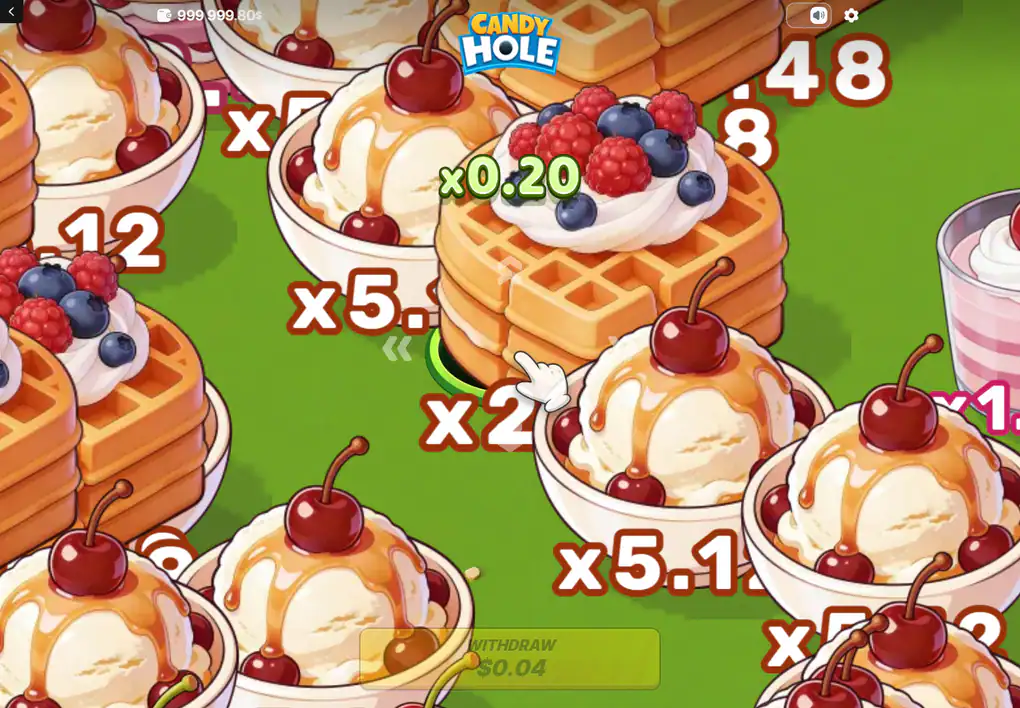
Object values are printed on the field itself, and the running number sits beside the hole.
The ceiling is x500, and a cash limit arrives before it
The pre-round screen carries a speech bubble reading x500 MAX COEF. That is the ceiling of the coefficient, shown before anything has happened, and it is not the number that moves during play.
Where the two numbers meet
The review that covers this title does the arithmetic out loud: at the top stake its x500 would come to seventy-five thousand, and the game will not pay it, because a single round is capped at 10,000 in cash whatever the coefficient reached. The ceiling that bites is the money one, and it bites first at every stake above twenty.
What the ceiling is not
It is not a jackpot, nothing accumulates towards it, and no feature exists to aim at it. The coefficient a given round can reach at all is drawn fresh each time, so there is no "the" ceiling to plan towards, only one that was decided before you touched anything.
The mine is the part the screenshots never showed
Under any sweet on the field there may be a mine, and nothing distinguishes a safe object from a mined one in advance. Swallow the wrong one and the round stops where it stands: the coefficient goes, the stake goes with it, and there is no partial recovery.
This is the single most important thing about the game and it is absent from every frame of the session this site was originally built from, for an ordinary reason — that session did not hit one. A description assembled only from pictures of a game going well will describe a game that cannot be lost. That is the mistake this rewrite exists to correct, and it is why the studio's own sentence about mines is quoted on three of these six pages.
Where the older pages here came from, and what they could not see
This address has described this game for a while, and the description was assembled from a single recorded session: a free account holding 1,000,000.00, a stake of 0.2, a loading bar caught at 51%, a running value of x0.20 and a collect figure of 0.04. Those pages said so themselves, repeatedly and honestly, and as a description of the interface they are still accurate.
As a specification they were missing the half of the game that only shows up when something goes wrong. A session that was never lost cannot show a mine. A session played for the length of one screenshot cannot show the hole outgrowing the small objects. A single account cannot show what the stake range is, what the cash cap is, or what the maker publishes about the return. All four of those are now on this site, each with the source that states it attached.
It is worth saying plainly what that means for anybody reading a page about a casino game anywhere. Pictures are evidence of what a screen looked like at one moment, and almost nothing else. They cannot establish a limit, a frequency, an average or a rule, because every one of those is a statement about many rounds and a picture is a statement about one.
The loading bar, caught partway: one of the five frames the older pages here were built from.
Where a free round is offered, and where it is not
Availability belongs to the venue rather than to the game, and the venues do not agree. funbet.com, malinacasino.com, hunterplay.com each present this title in a free mode. slotcatalog.com and vynzo.bet list the same title and state plainly that no free mode is available on their side — one of them with a page headed as if there were.
So the honest answer is conditional: free rounds of this title exist, you will not find one everywhere, and the only way to know about a particular account is to open it there. This site runs no game of its own. There is no demonstration window on these pages and no button here dressed up as one.
One of the two refusals is worth a sentence by itself, because it is the sort of thing that teaches a reader to check. The catalogue page concerned is headed as though a free round were available on it and then states in its own body that none is. Nobody is being dishonest: a page template promises what the catalogue usually carries, and this title is one of the ones it does not. The lesson is simply that a heading is not a fact and the body of the page is where the answer lives.
Where a free round is offered it is reported to be the whole game rather than a reduced version of it — the same objects, the same growth, the same mines — with play chips credited automatically. That is worth more here than it would be on a game of spins, because the thing a free round teaches is manual timing, and timing is the only part of this game a player actually controls.
Playing from Britain: the age, the money and the two lines
Commercial gambling in Great Britain is for 18 and over, with no exception for a game that looks like a phone puzzle. Rounds here finish in seconds and are started by hand one at a time, which makes an hour hold a great many more finished rounds than an hour at a table, and makes a stake chosen casually a much larger commitment than it looks.
The game offers no help with that. There is no loss limit inside it, no session clock, no round counter and no setting that will stop a session on a player's behalf — the only running figure anywhere on the screen is the balance in the top corner, and on small stakes it moves far too slowly to read as a warning. Whatever limit applies is the one a person brings and keeps, and the sensible moment to decide it is before the first round rather than during the tenth.
If it has stopped being a game, help costs nothing and asks for nothing. 0808 8020 133 answers in England and Scotland and 0808 2819 265 answers in Wales, round the clock, every day of the week. GamStop is the self-exclusion scheme, and it carries no telephone number that anyone could get wrong.
None of that is a reason to avoid the title and all of it is a reason to meet it with the facts in hand. This site exists because the pages about this game, including the older ones at this address, have mostly described a round that cannot be lost, and a reader deserves the other half before the tab opens rather than after.
Questions readers ask first
Is Candy Hole a slot?
No. It has no reels, no lines and no symbols in the usual sense: the field is open space and a round advances only while the hole is being steered across it.
The studio files it in its catalogue under "Casual"; the review covering it calls it an arcade instant game with crash elements.
What is the published return?
96%, with no competing figure anywhere.
Published by 100HP Gaming, repeated by the review and by the catalogue and operator listings — and printed by that studio against every title it makes, which is what it is worth.
Can a round be lost outright?
Yes. A mine can sit under any object on the field, it cannot be told apart from a safe one beforehand, and swallowing it ends the round and takes the stake.
Stated by 100HP Gaming in its own description of the game.
Does the x500 ceiling mean a round can pay five hundred times the stake?
Only up to a point. A single round is capped at 10,000 in cash, so above a stake of about twenty the money limit is reached before the coefficient ceiling is.
The cash cap and the arithmetic behind it come from the review; the ceiling itself is printed on the game's own pre-round screen.
Is there a free version?
At some venues, not at others. Three of the sites listing this title offer a free round and two state that they do not.
Is this site the operator?
No. It holds no balance, takes no payment and runs no game. It is paid when a reader follows its button to an operator, and that is the whole of its commercial interest.
Five further pages take the parts of this apart: one round from the loading bar onward, the twelve object values and what they are for, the stake panel and the two ways of steering, the phone layout, and the features the studio and the press describe in two different ways.
Carry on with
A round walks one round from the loading bar to the moment the collect control becomes usable.
Values sets out the twelve object values and which end of that ladder a round is actually played for.
Controls documents the stake panel, the two ways of steering, and the currency label above the amount.
On a phone compares the portrait layout with the desktop one and says what changes when a live field has to be steered by thumb.
Features covers the growing hole, the mines, the bonus that carries two names, and the fairness panel.