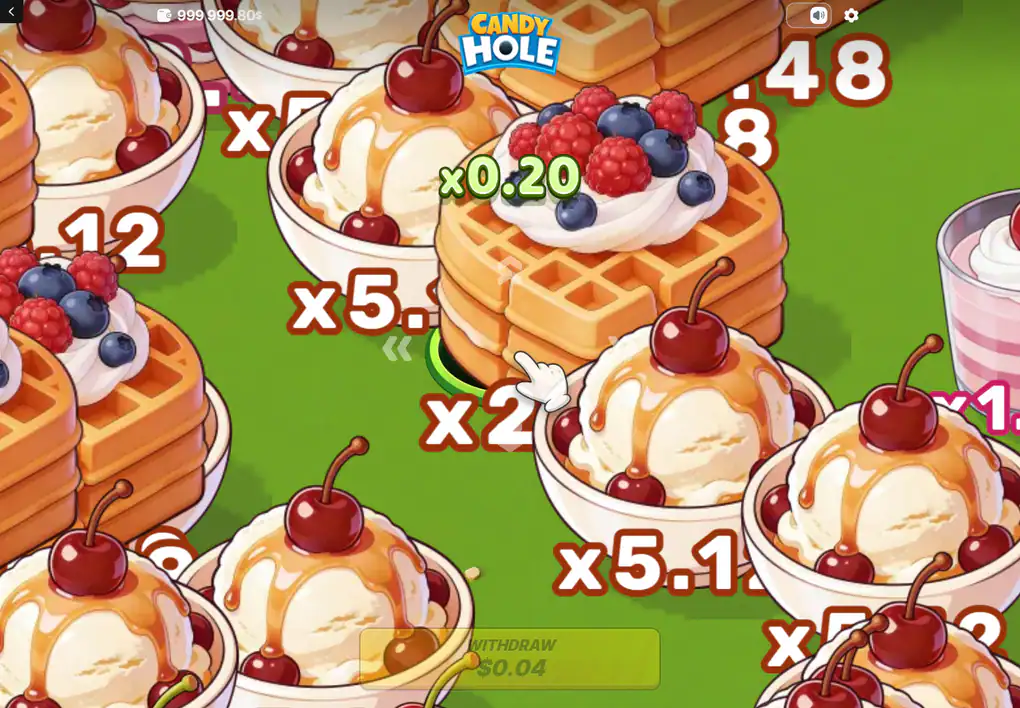
The objects on the field are not decoration with a value attached; they are the value. Twelve of them are published, they span four orders of magnitude, and the shape of that spread explains the whole rhythm of a round better than any description of the mechanic does.
A round in progress, with object values printed on the field itself.
The twelve object values, smallest first
This is the published ladder, in the order a round can actually reach it: the hole starts small enough for a macaron and has to grow on cheap objects before an expensive one will fit inside it.
Pink macaron — x0.01
Chocolate fudge — x0.01
Raspberry tart — x0.01
Blueberry muffin — x0.02
Sprinkled doughnut — x0.08
Orange jelly — x0.32
Chocolate strawberry — x0.62
Cherry parfait — x1.28
Chocolate cake — x2.56
Caramel ice cream — x5.12
Waffle — x20.48
Celebration cake — x102.40
Why the bottom half of the ladder is not for winning
Three objects pay a hundredth, one pays a fiftieth, and by the time you reach the jelly you are still under a third. Added together, the entire bottom half barely moves the counter. Those objects are not what a round is played for — they are what the hole eats in order to become able to eat something else.
The top four are a different game. Ice cream at x5.12, a waffle at x20.48 and a celebration cake at x102.40 are where a round's result is decided, and reaching them means spending time on the field with a growing stake of accumulated coefficient and a mine under any object you approach. That is the trade the whole product is built on, and nothing in the interface softens it.
Look at the gaps rather than the values and the design becomes legible. From the macaron to the jelly is a factor of thirty-two; from the jelly to the cake another eight; from the cake to the celebration cake another forty. The ladder does not rise, it accelerates, and it accelerates precisely where the round has been running longest and has the most to lose.
What a published ladder is, and what it is not
Twelve names with twelve values is a paytable in everything but the word, and it is useful in the way a paytable is useful: it says what each thing is worth if you get it. It says nothing whatever about how often any of them appears, how many are on a field at once, or how large the hole has to be before a given one fits.
That second set of facts is the one that would let anybody calculate anything, and nobody publishes it. The studio does not; the review that prints the ladder does not; the catalogue listing the title leaves its own fields for variance and maximum win empty. So the ladder is worth reading as a map of what matters and worth refusing as a basis for arithmetic.
It is also why this page carries no worked example of a profitable round. Any such example would need a frequency to be honest, the frequency is not available, and an example built without one is a story about a good evening dressed up as a calculation.
There is a second absence behind the first. Nobody publishes how many mines a field holds, or whether the proportion changes as the hole grows, and that single unknown governs everything about how far a round can reasonably be pushed. Without it the ladder describes the reward side of a trade whose cost side has never been printed by anyone, which is worth saying out loud before the values are read as a plan.
The catalogue listing the title is honest about its own gaps in a way worth copying: against maximum win and against variance it prints nothing at all rather than a guess. Two empty fields on a page about a casino game are a better signal than two filled ones, and this page is built on the same principle wherever there is nothing solid to put.
The running number, and the money underneath it
Two displays move during a round and they are not the same thing. A green coefficient sits beside the hole — x0.20 in the frame kept here — and a cash figure sits in the collect control below it, which is that coefficient multiplied by the amount staked. Object labels stay printed on the field in outlined numerals; x0.12, x2 and x5.1 are all legible in the same frame.
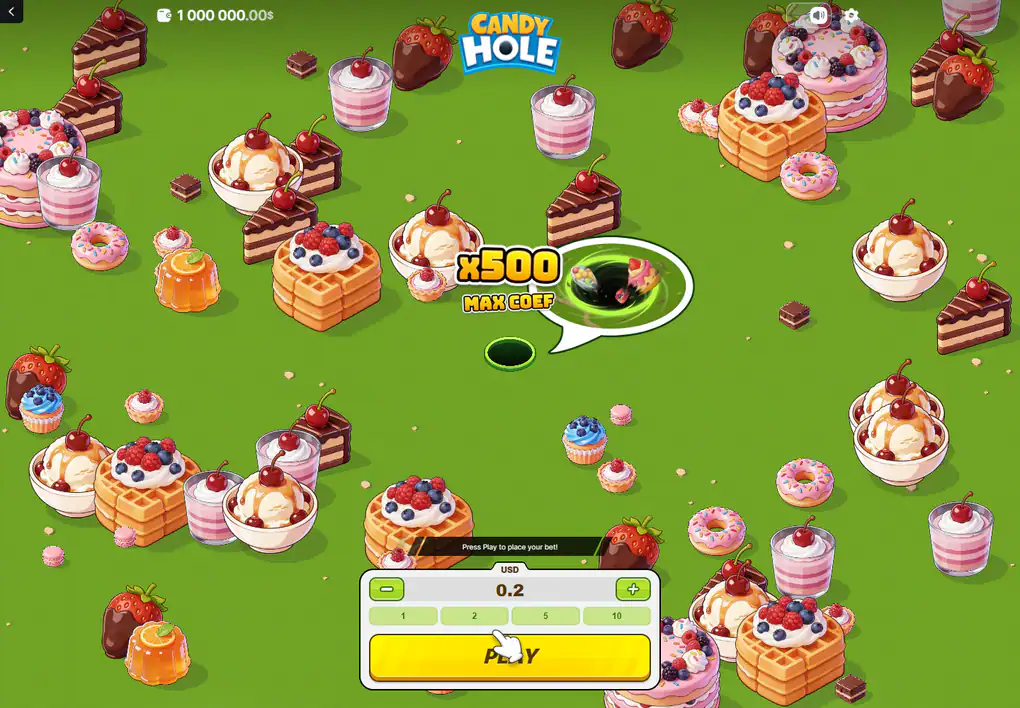
The ceiling is announced before the round, in a bubble beside the empty hole.
x500 is the ceiling, not the number on screen
The pre-round bubble reads x500 MAX COEF and it is a statement about the top of the range, made before a round exists. The number that moves while you play is the running coefficient, which in the state recorded here was x0.20 — two and a half thousand times smaller. Our older pages kept those two apart deliberately and this rewrite keeps the distinction, because confusing them turns a ceiling nobody will see into a figure that sounds like a typical result.
Where the ten-thousand limit cuts in
A round pays at most 10,000 in cash, whatever coefficient it reached. The review covering this title spells out the consequence: stake the maximum of 150 and x500 would be seventy-five thousand, of which the game pays the cap and discards the rest.
Run that backwards and it becomes useful rather than alarming. The coefficient ceiling is only reachable in full below a stake of twenty; above that, the money limit is the real top of the game, and a larger stake buys a lower maximum multiple rather than a bigger one.
At the very top of the published range the gap is wide. A player staking the maximum is playing a game whose effective ceiling is about sixty-six times the stake, not five hundred, and nothing in the interface says so: the bubble on the pre-round screen prints the same x500 whatever amount is selected underneath it. That is not a trick, it is a headline figure meeting a payout rule, and it is the single most useful thing on this page for anybody who was planning to play large.
The cap is also the reason there is no point hunting for a round that pays several times the maximum. The limit is flat, it applies per round, and nothing accumulates across rounds, so there is no arrangement of stakes under which the number above the cap ever becomes payable.
An average of 96% is taken across everyone, not across an evening
A return figure describes an enormous number of rounds played by an enormous number of people. It is not a promise that a hundred staked comes back as ninety-six, and it carries no information at all about any particular session, which can end at nothing or at several times the stake with equal indifference to the published figure.
The review covering this title calls the variance low, meaning small results arrive often and the objects that would change a session arrive rarely. That is one publication's word: the studio grades nothing, and the catalogue that lists the game leaves its variance field empty. It is worth knowing and it is not a specification.
There is one thing the published figure does settle, and it is the thing people most often hope it does not. A game returning a fixed share of everything staked cannot make a rare large result more common without making the common small ones smaller. The celebration cake at the top of the ladder is not waiting to be found by somebody patient; it is rare because of what it pays, and it would stop paying that if it stopped being rare. Every claim that a particular approach gets you there more often is a claim that the arithmetic can be talked round.
The same reasoning disposes of the opposite hope. Collecting early does not beat the figure either: it narrows the spread of what an evening can do, trading the rare large result for a steadier small one, and leaves the average exactly where it was. Choosing when to stop is a real choice about what kind of session you want, and it is not a way of being paid more.
Questions about the value path
What is the largest object value?
A celebration cake at x102.40, roughly a hundred times the smallest objects on the field and eight thousand times the cheapest.
The twelve-value ladder is published by the review covering this title; the studio publishes no paytable.
Can a round reach x500?
That is the stated ceiling of the coefficient. Whether a given round can approach it at all is decided before you touch anything, and the cash cap of 10,000 limits what any of it is worth above a stake of about twenty.
Do the object values change between rounds?
The published ladder does not. What changes is which objects are within reach of a hole of a given size, and that depends entirely on what the round has swallowed so far.
Is there a jackpot?
No. Nothing accumulates across rounds and no feature pays outside the object values and the ceiling above them.
Does 96% mean the stake comes back?
No. It is a long-run average over all play, not a rate applied to a session, and a short session is as likely to end at nothing as at a multiple of the stake.
What the panel under the field offers, and what the label above the amount is actually a property of, is the subject of the controls page.
Carry on with
The game starts with what the title is, who built it, and what the single published return figure rests on.
A round walks one round from the loading bar to the moment the collect control becomes usable.
Controls documents the stake panel, the two ways of steering, and the currency label above the amount.
On a phone compares the portrait layout with the desktop one and says what changes when a live field has to be steered by thumb.
Features covers the growing hole, the mines, the bonus that carries two names, and the fairness panel.